You’ve spent time carefully adding UTM parameters to your campaign URL. Now it looks something like this:
https://example.com/landing-page?utm_source=facebook&utm_medium=paid_social&utm_campaign=summer_sale_2024&utm_content=carousel_ad_v2That’s 130+ characters of URL that looks messy, takes up space in social posts, and might even scare users away from clicking. The solution? URL shorteners. But here’s the worry many marketers have: will shortening the URL break my tracking?
The short answer: No, it won’t. URL shorteners preserve your UTM parameters perfectly. Let me explain how it works and show you the best way to do it.
How URL Shorteners Actually Work
Understanding why your tracking stays intact requires knowing what happens behind the scenes when someone clicks a shortened link.
URL shorteners use something called a 301 redirect. When you shorten a URL, the service stores your complete original URL (with all those UTM parameters) in their database. They give you a short link like bit.ly/3xK9mPq.
When someone clicks that short link:
- Their browser contacts the shortener’s server
- The server looks up the original URL in its database
- It sends a 301 redirect response with your full URL
- The browser follows the redirect to your page — with all UTM parameters intact
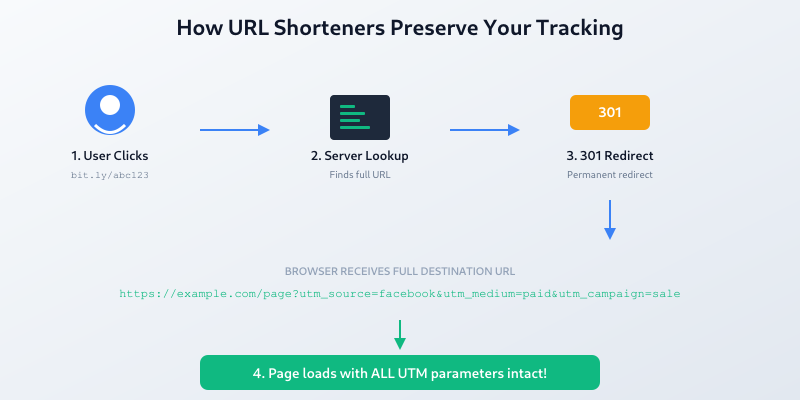
The shortened URL is simply a pointer. Your actual destination URL, including every tracking parameter, is preserved exactly as you created it.
Step-by-Step: Shorten a URL While Keeping Tracking
There are two ways to shorten URLs with UTM parameters. Both work perfectly.
Method 1: Build First, Then Shorten
This is the most straightforward approach:
- Create your tracked URL — Use a UTM builder tool or add parameters manually
- Copy the full URL — Including all UTM parameters
- Paste into a URL shortener — Bitly, TinyURL, or any shortener you prefer
- Use the shortened link — Share it anywhere
Example:
- Original:
https://mysite.com/ebook?utm_source=linkedin&utm_medium=organic&utm_campaign=lead_gen - Shortened:
bit.ly/ebook-guide
When clicked, the short link redirects to your full tracked URL. Google Analytics (or any analytics tool) sees the complete UTM parameters.
Method 2: Use an Integrated Tool
Several platforms combine UTM building and URL shortening in one interface:
- Bitly — Add UTM parameters directly when creating short links
- Short.io — Built-in campaign parameter fields
- UTM.io — Full UTM management with shortening
This approach saves time and reduces copy-paste errors.
Best URL Shorteners for Marketers
Not all URL shorteners are equal. Here’s what to look for and some solid options:
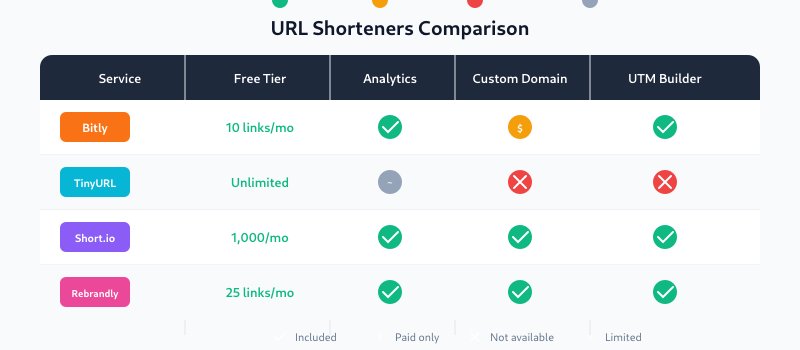
Bitly
The most popular choice for marketers. Bitly offers:
- Free tier with basic shortening
- Click analytics and geographic data
- Custom branded domains (paid)
- Built-in UTM parameter builder
Studies show branded short links can increase click-through rates by up to 34% compared to generic ones.
TinyURL
Simple and no-signup required:
- Completely free
- No account needed
- Custom aliases available
- Limited analytics
Best for quick, one-off links when you don’t need detailed click stats from the shortener itself.
Short.io
Good middle ground for growing teams:
- Generous free tier
- Custom domains included
- UTM builder integration
- Team collaboration features
Rebrandly
Focused on brand consistency:
- Custom branded domains
- Link management dashboard
- UTM presets
- API access
Best Practices for Shortened Tracking URLs
Follow these guidelines to get the most from your shortened links:
1. Keep UTM Parameters Consistent
Use lowercase letters and underscores. Be consistent with naming conventions across campaigns. utm_source=Facebook and utm_source=facebook will show as separate sources in analytics.
2. Use Descriptive Campaign Names
Even though the URL is shortened, your parameters should still be meaningful:
- Good:
utm_campaign=summer_sale_2024 - Bad:
utm_campaign=ss24
3. Consider Custom Short Links
Most shorteners let you customize the ending:
bit.ly/3xK9mPq→bit.ly/summer-ebook
Custom links are more memorable and look more trustworthy.
4. Track in Both Places
You get double data: the shortener shows clicks, and Google Analytics shows what users do after clicking. Use both.
5. Test Before Launching
Always click your shortened link and verify:
- It goes to the correct page
- UTM parameters appear in the URL bar
- The visit registers in Google Analytics real-time report
Common Mistakes to Avoid
Shortening the Wrong URL
Make sure you copy the full URL with parameters before shortening. If you shorten just https://example.com/page without the UTM parameters, you’ll lose tracking entirely.
Double-Encoding Parameters
Some tools automatically encode special characters. If you encode manually and the shortener encodes again, parameters may break. Test your links.
Using Unreliable Shorteners
Stick with established services. If a free shortener goes offline, all your links break — and your tracking data history with them.
Forgetting Mobile Behavior
Some social apps open links in in-app browsers that may handle redirects differently. Test on mobile devices before major campaigns.
What About SEO?
A common concern: do URL shorteners hurt SEO? The answer is no.
301 redirects pass link equity (PageRank) to the destination URL. Google has confirmed this multiple times. Shortened links in social media posts, emails, and ads won’t negatively impact your search rankings.
That said, for permanent links on your website (like internal navigation), use your actual URLs rather than shortened ones. Shorteners are best for external distribution channels.
Quick Summary
Here’s what you need to remember:
- URL shorteners preserve UTM parameters — The 301 redirect passes your full tracking URL
- Build your tracked URL first, then shorten it (or use integrated tools)
- Test your links before launching campaigns
- Use reputable shorteners like Bitly, TinyURL, or Short.io
- Custom branded links increase trust and click-through rates
Now you can confidently share clean, short URLs while keeping every piece of tracking data intact. Your analytics will thank you.
Related: What Are UTM Parameters? Complete Guide for Beginners