If you’ve ever wondered how marketers know exactly which email, social post, or ad brought visitors to their website, the answer is UTM parameters. These simple text codes added to URLs are one of the most powerful — and most underused — tools in digital marketing.
When I first started tracking campaigns, I made every mistake possible: inconsistent naming, tagging internal links, mixing uppercase and lowercase. My analytics reports were a mess. It took me months to clean up the data and establish a system that actually worked.
In this guide, I’ll explain what UTM parameters are, how they work, and how to use them correctly from day one — so you don’t have to learn the hard way like I did.
What Are UTM Parameters?
UTM parameters (Urchin Tracking Module) are short text codes that you add to the end of a URL. They tell your analytics tool — like Google Analytics — where your traffic came from and which campaign it belongs to.
The name “Urchin” comes from Urchin Software Corporation, which Google acquired in 2005. That software eventually became Google Analytics, but the UTM naming convention stuck around.
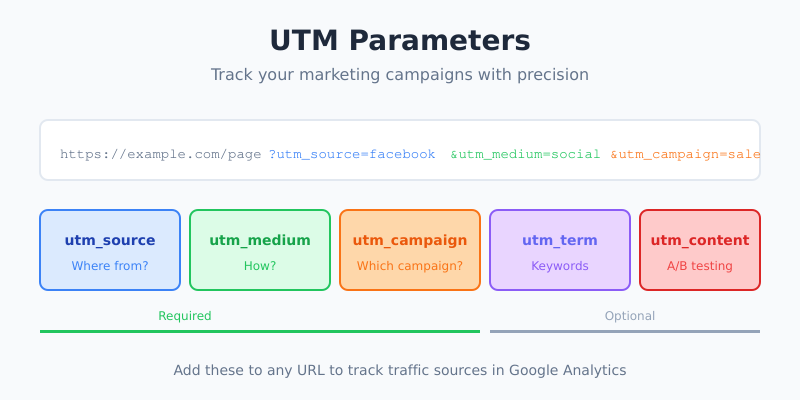
Here’s what a URL with UTM parameters looks like:
https://example.com/landing-page?utm_source=facebook&utm_medium=social&utm_campaign=spring_saleEverything after the ? is tracking information. When someone clicks this link, Google Analytics records that the visitor came from Facebook, through a social media post, as part of the “spring_sale” campaign.
The Five Standard UTM Parameters
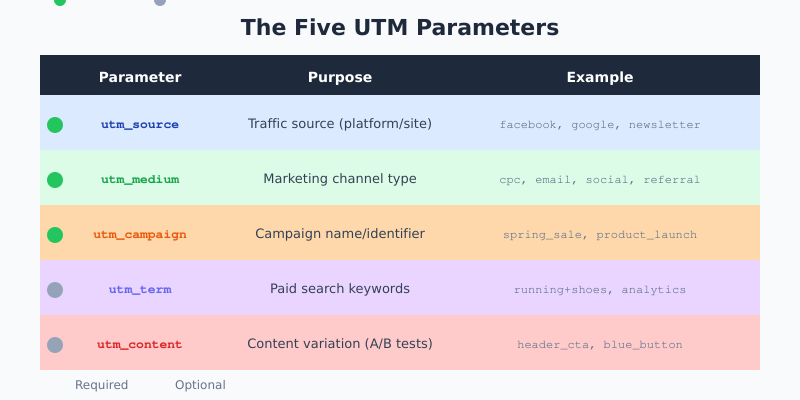
There are five UTM parameters you can use. Three are essential, two are optional but useful in specific situations.
Required Parameters
utm_source — Identifies where the traffic comes from. This is the platform, website, or publisher sending visitors to you.
- Examples:
google,facebook,newsletter,linkedin
utm_medium — Identifies the marketing channel or type of link. Think of this as the “how” — how is this traffic reaching you?
- Examples:
cpc(cost-per-click),email,social,referral,banner
utm_campaign — Identifies the specific campaign name. This helps you group all traffic from a particular promotion or initiative.
- Examples:
spring_sale,product_launch,black_friday_2026
Optional Parameters
utm_term — Originally designed for paid search to identify keywords. Still useful for tracking specific search terms in PPC campaigns.
- Examples:
running+shoes,analytics+software
utm_content — Differentiates similar content or links within the same campaign. Perfect for A/B testing.
- Examples:
header_link,footer_link,blue_button,red_button
How UTM Parameters Work
The process is straightforward:
- You create a URL with UTM parameters
- You share that URL in your marketing (email, social post, ad)
- Someone clicks the link
- Their browser sends them to your website with the UTM data in the URL
- Google Analytics reads the parameters and records the visit with that campaign data
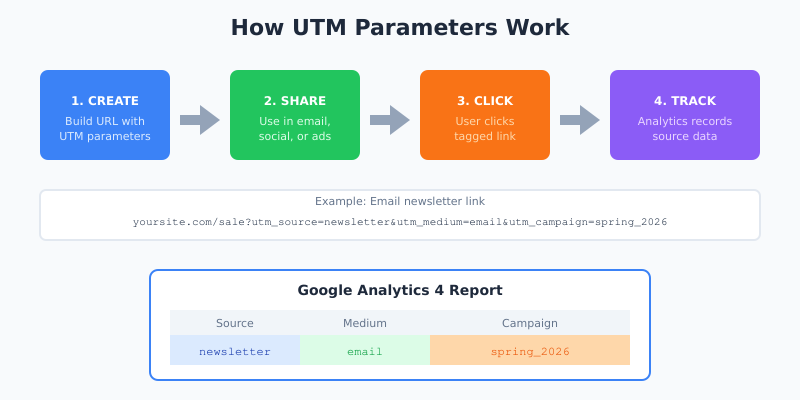
The data then appears in your analytics reports. In Google Analytics 4, you can find it under Reports → Acquisition → Traffic acquisition. You’ll see your traffic broken down by source, medium, and campaign.
UTM Parameter Examples
Let me show you some real-world examples to make this concrete.
Email Newsletter
https://yoursite.com/blog/new-post?utm_source=newsletter&utm_medium=email&utm_campaign=weekly_digest_jan2026This tells you the visitor came from your newsletter, via email, as part of your January weekly digest.
Facebook Ad
https://yoursite.com/product?utm_source=facebook&utm_medium=cpc&utm_campaign=retargeting&utm_content=carousel_adThis tracks a paid Facebook ad (cpc = cost-per-click), specifically a carousel ad format, in your retargeting campaign.
Instagram Bio Link
https://yoursite.com/?utm_source=instagram&utm_medium=social&utm_campaign=bio_linkSimple tracking for organic traffic from your Instagram profile.
Partner Referral
https://yoursite.com/signup?utm_source=partnersite&utm_medium=referral&utm_campaign=affiliate_q1Tracks traffic from a partner website as part of your Q1 affiliate program.
UTM Best Practices
After years of building and fixing UTM tracking systems, here are the rules I follow:
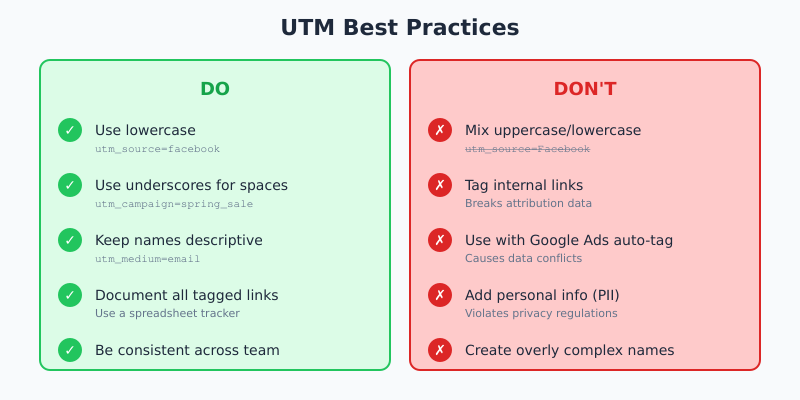
1. Always Use Lowercase
UTM parameters are case-sensitive. utm_source=Facebook and utm_source=facebook will appear as two different sources in your reports. Pick lowercase and stick with it.
Tip: Create a naming convention document and share it with your team. Consistency is everything.
2. Use Underscores Instead of Spaces
Spaces in URLs become %20, which looks messy and can cause issues. Use underscores: spring_sale not spring sale.
3. Keep Names Descriptive but Short
You need to understand what utm_campaign=fb_ret_q1_2026_v2 means six months from now. Be specific enough to be useful, but not so long that URLs become unmanageable.
4. Never Tag Internal Links
Only use UTM parameters for external traffic — links from emails, social media, ads, or other websites. If you tag internal links (links within your own site), you’ll overwrite the original source data and break your attribution.
5. Don’t Use UTMs with Google Ads Auto-Tagging
If you have auto-tagging enabled in Google Ads, don’t add manual UTM parameters. Auto-tagging uses a GCLID parameter that provides richer data. Adding UTMs can cause conflicts and data discrepancies.
6. Document Everything
Keep a spreadsheet of all your UTM-tagged links. Include the full URL, what it’s used for, and when it was created. Future you will be grateful.
How to Create UTM Parameters
You have several options for building UTM-tagged URLs:
Manual Method
Simply add the parameters to your URL by hand:
https://yoursite.com/page?utm_source=SOURCE&utm_medium=MEDIUM&utm_campaign=CAMPAIGNReplace SOURCE, MEDIUM, and CAMPAIGN with your values. Make sure to:
- Start with
?after the base URL - Separate parameters with
& - Use
=between parameter name and value
Google’s Campaign URL Builder
Google provides a free Campaign URL Builder tool. Enter your URL and parameter values, and it generates the tagged URL automatically.
Spreadsheet Templates
For teams managing many campaigns, a spreadsheet with formulas to concatenate URLs works well. This also serves as documentation.
Viewing UTM Data in Google Analytics 4
Once your tagged links are getting clicks, here’s how to see the data in GA4:
- Go to Reports → Acquisition → Traffic acquisition
- By default, you’ll see data grouped by “Session default channel grouping”
- Click the dropdown and change it to “Session source/medium” or “Session campaign”
- Now you’ll see your UTM parameter data
You can also create custom explorations to analyze UTM data in more detail, comparing campaigns side by side or tracking conversions by source.
Common UTM Mistakes to Avoid
I’ve seen (and made) all of these mistakes:
Inconsistent naming: One person uses utm_source=LinkedIn, another uses utm_source=linkedin_ads. Now you have split data that’s hard to reconcile.
Tagging internal links: This breaks attribution. If someone arrives from Google, clicks an internal link with UTMs, their source changes from “google” to whatever you tagged internally.
Forgetting to tag: That one email you sent without UTMs? Its traffic shows up as “direct” in your reports, mixed with people who typed your URL directly. You’ll never know how well that email performed.
Using UTMs for tracking within apps: UTM parameters are designed for web analytics. For app tracking, use deep links and mobile measurement partners instead.
Overly complex naming: If you need a decoder ring to understand utm_campaign=em_nl_wk3_seg2_var_b_2026, your system is too complicated.
UTM Parameters and Privacy
UTM parameters are visible in the URL, which means:
- Users can see them (and modify or remove them)
- They may appear in shared links, bookmarks, or browser history
- They don’t contain personal information by default, but don’t add any
Never put personally identifiable information (PII) in UTM parameters. Don’t use email addresses, names, or user IDs. This violates Google Analytics Terms of Service and privacy regulations like GDPR.
FAQ
Do UTM parameters affect SEO?
No, UTM parameters don’t directly affect your search rankings. However, Google recommends using canonical tags if you’re concerned about duplicate content from multiple UTM variations of the same page. Most modern CMS platforms handle this automatically.
Can I use UTM parameters with any analytics tool?
Yes, most analytics platforms recognize UTM parameters, including Google Analytics, Adobe Analytics, Mixpanel, and others. The parameters are an industry standard.
How many UTM parameters should I use?
At minimum, use utm_source, utm_medium, and utm_campaign. Add utm_content when A/B testing or when you have multiple links in the same email or page. Use utm_term mainly for paid search keyword tracking.
Do I need UTM parameters for Google Ads?
If you have auto-tagging enabled in Google Ads (which is recommended), you don’t need to add UTM parameters manually. Auto-tagging provides more detailed data automatically. Only use manual UTMs for Google Ads if you have a specific reason and understand the implications.
How long should my UTM campaign names be?
Keep them descriptive but concise — typically 20-40 characters. You need to recognize them in reports months later, but excessively long names make data harder to read and URLs unwieldy.
Conclusion
UTM parameters are simple to implement but powerful for understanding where your traffic comes from. Start with the three required parameters — source, medium, and campaign — and build from there.
The key to success is consistency. Create a naming convention, document your links, and make sure everyone on your team follows the same rules. Clean data today means accurate insights tomorrow.
If you’re ready to start tagging your URLs, try our free UTM Builder tool to create properly formatted links without the manual work.