You check your Google Analytics report and see “Bounce Rate: 65%.” Is that good? Bad? Should you panic?
Bounce rate is one of the most misunderstood metrics in web analytics. It sounds simple — the percentage of visitors who “bounce” away from your site. But what exactly counts as a bounce, what’s a normal rate, and when should you actually worry about it?
Let’s break it down in plain terms.
What Is Bounce Rate?
Bounce rate is the percentage of visitors who leave your website after viewing only one page, without taking any meaningful action.
Think of it like this: someone walks into a store, looks around for a few seconds, and walks out without touching anything or talking to anyone. That’s a bounce.
On a website, a “bounce” traditionally meant a visitor who:
- Landed on a page
- Didn’t click any links
- Didn’t fill out any forms
- Didn’t visit any other pages
- Left the site
The bounce rate formula is straightforward:
Bounce Rate = (Single-page sessions ÷ Total sessions) × 100
If 1,000 people visit your site and 400 of them leave after viewing just one page, your bounce rate is 40%.
Bounce Rate in GA4: The New Definition
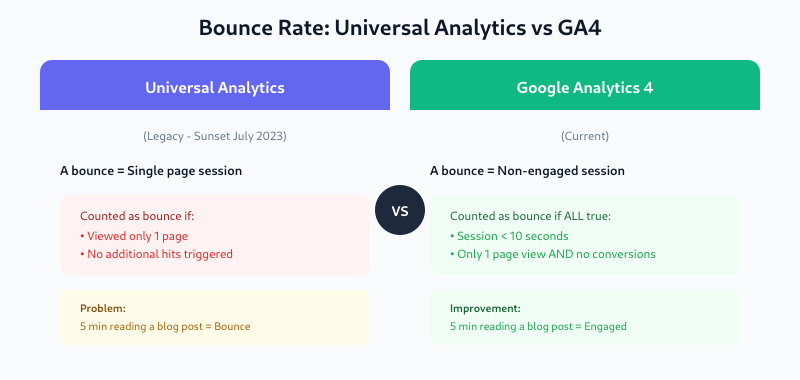
If you’re using Google Analytics 4 (GA4), bounce rate works differently than in the old Universal Analytics.
In GA4, bounce rate is tied to a concept called engagement. A session is considered “engaged” if it meets ANY of these criteria:
- Lasts longer than 10 seconds
- Includes 2 or more page views
- Triggers a conversion event (like a purchase or sign-up)
Bounce rate in GA4 = percentage of sessions that were NOT engaged.
This is actually a smarter definition. Under the old system, someone who spent 5 minutes reading your entire blog post would count as a “bounce” if they didn’t click to another page. That never made sense. GA4 fixes this by considering time spent on the page.
What’s a Good Bounce Rate?
The honest answer: it depends. But here are some benchmarks to give you context.
General Guidelines
- 26-40%: Excellent
- 41-55%: Average
- 56-70%: Room for improvement
- 70%+: Worth investigating
The average bounce rate across all industries is around 44%.
Bounce Rate by Industry
Different industries have very different norms:
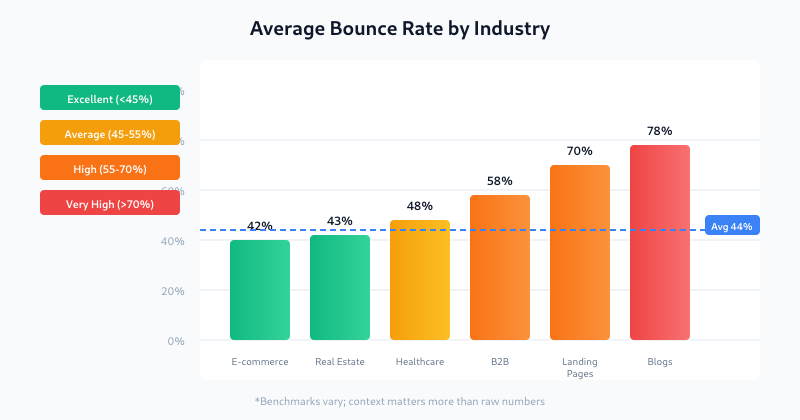
| Industry | Average Bounce Rate |
|---|---|
| E-commerce | 37-47% |
| Real Estate | 41-44% |
| Healthcare | 40-55% |
| B2B Services | 50-65% |
| Blogs & Content Sites | 65-90% |
| Landing Pages | 60-90% |
Bounce Rate by Device
Mobile users bounce more often than desktop users:
- Mobile: ~51%
- Desktop: ~43%
This makes sense — mobile users are often browsing casually, dealing with slower connections, or multi-tasking.
Why Do Visitors Bounce?
High bounce rates usually come down to a mismatch between what visitors expected and what they found. Here are the most common causes:
1. Slow Page Load Time
If your page takes more than 3 seconds to load, many visitors will leave before it even finishes loading. Every second of delay increases bounce rate.
2. Misleading Title or Meta Description
If someone clicks expecting one thing and finds another, they’ll leave immediately. Your search result preview should accurately represent your content.
3. Poor Mobile Experience
Tiny text, buttons too small to tap, horizontal scrolling — these frustrations drive mobile users away fast.
4. Intrusive Pop-ups
Aggressive pop-ups, especially ones that appear immediately or block content, cause visitors to leave.
5. Hard-to-Read Content
Walls of text, poor contrast, tiny fonts, or cluttered layouts make people bounce. Good formatting matters.
6. No Clear Next Step
If visitors don’t know what to do next — no obvious call-to-action, no related links — they’ll just leave.
7. The Visitor Found Their Answer
Sometimes a bounce isn’t bad. If someone googles “What time is it in Tokyo?” and your page answers that question immediately, they got what they needed. Mission accomplished.
How to Reduce Bounce Rate
If your bounce rate is higher than you’d like, here are practical steps to improve it:
Speed Up Your Pages
- Compress images
- Enable browser caching
- Use a content delivery network (CDN)
- Minimize JavaScript and CSS
Test your speed with Google PageSpeed Insights.
Match Content to Search Intent
Look at the search queries bringing visitors to each page. Does your content actually answer those queries? If not, update it.
Improve Readability
- Use short paragraphs
- Add subheadings
- Include bullet points
- Break up text with relevant images
Add Internal Links
Give visitors a reason to explore more. Link to related articles, products, or resources within your content.
Use Clear Calls-to-Action
Tell visitors what to do next: “Read the full guide,” “Try the free tool,” “Sign up for updates.”
Fix Mobile Issues
Test your site on actual mobile devices. Fix any usability problems you find.
Rethink Pop-up Timing
If you use pop-ups, delay them until the visitor has engaged with the content. Exit-intent pop-ups are less annoying than immediate ones.
When High Bounce Rate Is Actually Fine
Not all bounces are bad. Some pages are designed to give visitors exactly what they need in a single view:
- Contact pages: Visitor got your phone number or address
- Single-purpose tools: Calculator, converter, or generator pages
- Quick reference content: Definitions, specifications, hours of operation
- Blog posts: Reader consumed the article (especially if time on page is high)
In these cases, focus on whether visitors accomplished their goal, not whether they clicked to another page.
Bounce Rate vs. Exit Rate
These are often confused but measure different things:
- Bounce rate: Percentage of sessions that started AND ended on a page (single-page sessions)
- Exit rate: Percentage of all pageviews where that page was the last one viewed
A page can have a low bounce rate but high exit rate if people reach it after viewing other pages and then leave.
How to Check Bounce Rate in GA4
Bounce rate isn’t shown by default in GA4 reports. Here’s how to add it:
- Open any report (like Pages and Screens)
- Click the pencil icon to customize the report
- Click “Metrics” and then “Add metric”
- Search for “Bounce rate” and add it
- Save your changes
You can also see Engagement Rate (the opposite of bounce rate) which GA4 emphasizes more.
Key Takeaways
- Bounce rate measures the percentage of single-page, non-engaged sessions
- GA4 counts bounces differently — sessions under 10 seconds with no conversions or second page view
- Average bounce rate is around 44%, but varies widely by industry
- Common causes: slow speed, poor mobile experience, content mismatch, no clear CTAs
- High bounce rate isn’t always bad — context matters
- Focus on improving engagement rather than obsessing over the number itself
Bounce rate is just one metric. Use it alongside time on page, conversion rate, and user behavior data to get the full picture of how visitors interact with your site.