
You’ve been handed a data file. It might be a list of customers, a product catalog, or an export from some tool. Now you have to decide how to store it or share it. Two formats come up again and again: JSON and CSV.
When I first started moving data between tools, I treated these two as interchangeable. They’re not. Picking the wrong one can turn a five-minute job into an afternoon of cleanup. So let’s look at JSON vs CSV in plain terms — what each one is, where each shines, and how to choose.
Quick Comparison Table
| Feature | CSV | JSON |
|---|---|---|
| Structure | Flat rows and columns | Nested keys and values |
| Best for | Tabular data (spreadsheets) | Structured or nested data |
| Readability | Easy for people | Easy for machines |
| File size | Smaller | Larger (repeats key names) |
| Opens in Excel | Yes, directly | No, needs conversion |
| Handles nesting | No | Yes |
What Is CSV?
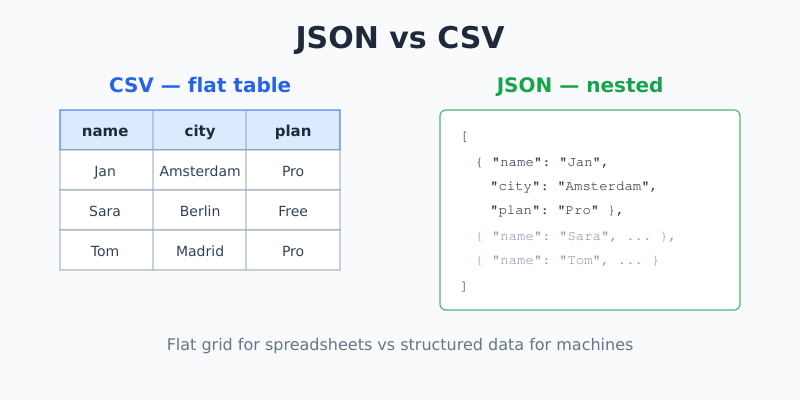
CSV stands for Comma-Separated Values. It’s a plain-text way to store a table. Each line is a row, and commas separate the columns.
Here’s a tiny customer list as CSV:
name,city,plan
Jan,Amsterdam,Pro
Sara,Berlin,Free
Tom,Madrid,Pro
The first line is usually a header row that names each column. Every line after it is one record. That’s the whole format. Because it’s so simple, almost every spreadsheet program and database can open or export CSV.
Note: The “comma” in CSV isn’t always a comma. Some files use semicolons or tabs as separators, especially in countries where the comma is used as a decimal point. The idea is the same — a single character splits the columns.
What Is JSON?
JSON stands for JavaScript Object Notation. It stores data as a set of key-value pairs, and it can nest data inside data. That nesting is the big difference from CSV.
Here’s the same customer list as JSON:
[
  { "name": "Jan", "city": "Amsterdam", "plan": "Pro" },
  { "name": "Sara", "city": "Berlin", "plan": "Free" },
  { "name": "Tom", "city": "Madrid", "plan": "Pro" }
]
Each record carries its own labels (name, city, plan), so you never have to guess which column is which. If you’ve worked with data from web tools or APIs, you’ve almost certainly seen JSON — it’s the standard format the web uses to send structured data.
The Key Difference: Flat vs Nested
CSV is flat. It’s a grid. Every record has the same columns, and there’s no room for sub-items.
JSON is nested. A value can itself be a list or another object. Say each customer can have several phone numbers. In JSON, that’s easy:
{
  "name": "Jan",
  "city": "Amsterdam",
  "phones": ["06-1234", "06-5678"]
}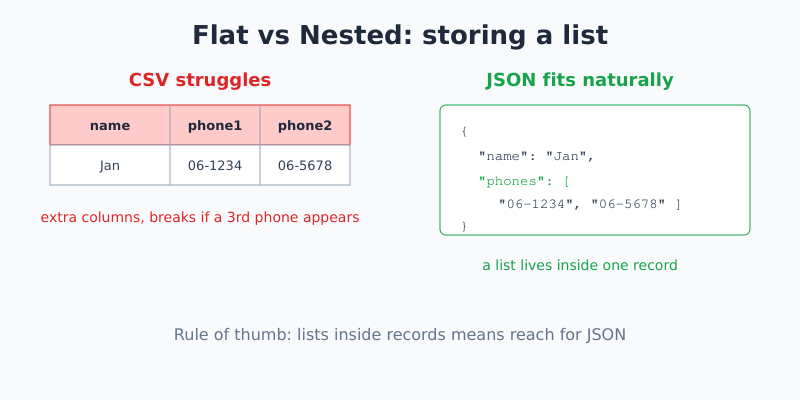
In CSV, that same data gets awkward. You’d have to split it across extra columns (phone1, phone2) or extra rows, and the structure starts to fall apart. This is the single best rule of thumb: if your data has lists inside records, reach for JSON.
When to Use CSV
- Spreadsheets. If a human will open the file in Excel or Google Sheets, CSV just works.
- Simple tables. A contact list, a sales export, a list of URLs — flat data fits CSV perfectly.
- Small file size. CSV doesn’t repeat the key names on every row, so it’s lighter.
- Bulk import. Most databases and email tools accept CSV uploads directly.
When to Use JSON
- APIs and web apps. JSON is the native language of web data exchange.
- Nested or mixed data. Lists inside records, objects inside objects — JSON handles it cleanly.
- Config files. Settings files often use JSON because it groups related options together.
- When the labels matter. Each value carries its own key, so the data is self-describing.
Can You Convert Between Them?
Yes — and you’ll do it often. Converting flat JSON (a simple list of objects with no nesting) into CSV is straightforward, and going the other way is too. The trouble only starts when the JSON is deeply nested, because a flat CSV grid has nowhere to put those inner lists.
A common workflow looks like this:
- You receive messy JSON from a tool or API.
- You paste it into a JSON formatter to clean it up and check it’s valid.
- You flatten the structure if needed, then export to CSV for a spreadsheet.
Before converting, always make sure your JSON is actually valid. One missing comma or bracket will break the whole file. Running it through a JSON validator first saves a lot of guesswork — that’s exactly why I built one into InstantUtils.
A Quick Mistake to Avoid
Watch your commas. In CSV, a comma inside a value (like a city written as “Amsterdam, NL”) will break your columns unless that value is wrapped in quotes. In JSON, a trailing comma after the last item is invalid. Both formats are picky about commas in their own way — so check the edges of your data.
Frequently Asked Questions
Is JSON better than CSV?
Neither is “better” — they solve different problems. CSV wins for simple tables that humans open in spreadsheets. JSON wins for nested data and anything machines pass around, like APIs. Choose based on the shape of your data, not on which sounds more modern.
Can Excel open JSON files?
Not directly the way it opens CSV. Excel needs you to import JSON through its Power Query feature or convert it to CSV first. CSV, by contrast, opens with a double-click. If a spreadsheet is the destination, CSV is the easier path.
Which format is smaller in file size?
CSV is usually smaller because it lists each column name only once, in the header. JSON repeats every key on every record, which adds up. For large flat datasets, that difference can be significant.
What if my data has nested lists?
Use JSON. CSV is a flat grid and has no clean way to store a list inside a single cell. Forcing nested data into CSV usually means extra columns or duplicated rows, which gets messy fast and is easy to misread later.
The Bottom Line
Think of it this way: CSV is a spreadsheet, JSON is a structure. If your data is a simple table for people, use CSV. If it’s nested or headed for an API, use JSON. Once you can spot whether your data is flat or nested, the choice makes itself.
Working with JSON today? Drop it into the free JSON Formatter & Validator to clean it up and catch errors before they cause trouble.

Jan van Dijk
Self-taught Dutch web analyst writing plain-English guides on analytics, data formats and developer tools — and building the free utilities I wish existed.
More about me →