
Regular expressions — regex for short — look like someone fell asleep on the keyboard. ^\d{3}-\d{4}$ isn’t exactly inviting. But once a few symbols click into place, regex becomes one of the most useful tools for searching and checking text.
I avoided regex for years because it looked intimidating. Then I needed to find every email address in a messy export, and a single pattern did in seconds what would have taken an hour by hand. This cheat sheet collects the patterns I reach for most, explained in plain English.
What Is Regex?
A regular expression is a small pattern that describes a set of strings. Instead of searching for an exact word, you describe the shape of what you want — “three digits, a dash, then four digits” — and regex finds everything that fits.
It powers find-and-replace in code editors, form validation, and log searching. The same core symbols work across most languages, so learning them once pays off everywhere.
Quick Reference Table
| Pattern | Matches | Example |
|---|---|---|
. |
Any single character | c.t matches cat, cot, cut |
\d |
Any digit (0-9) | \d\d matches 42 |
\w |
Word character (letter, digit, _) | \w+ matches hello_1 |
\s |
Whitespace (space, tab) | splits words |
^ |
Start of the line | ^Hi matches lines starting with Hi |
$ |
End of the line | end$ matches lines ending in end |
* |
Zero or more of the previous | ab* matches a, ab, abb |
+ |
One or more of the previous | ab+ matches ab, abb |
? |
Zero or one (optional) | colou?r matches color, colour |
{n} |
Exactly n times | \d{4} matches 2024 |
[abc] |
Any one listed character | [aeiou] matches any vowel |
| |
Either / or | cat|dog matches cat or dog |
The Building Blocks
Character Classes — what kind of character
These shortcuts match a type of character:
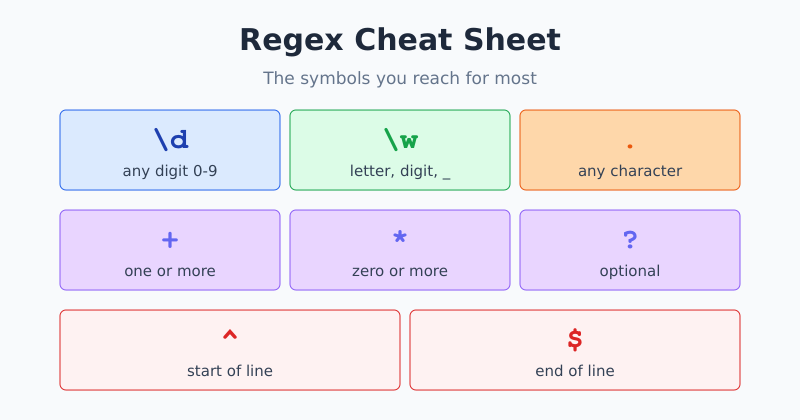
\d— a digit. Same as[0-9].\w— a “word” character: letters, digits, and underscore.\s— any whitespace, like a space or tab..— any character at all (except a line break).
Capital versions flip the meaning: \D means “not a digit,” and \S means “not whitespace.”
Quantifiers — how many
Quantifiers say how many times the thing before them should repeat:
*— zero or more.+— one or more.?— zero or one (makes it optional).{3}— exactly three.{2,4}— between two and four.
Anchors — where it sits
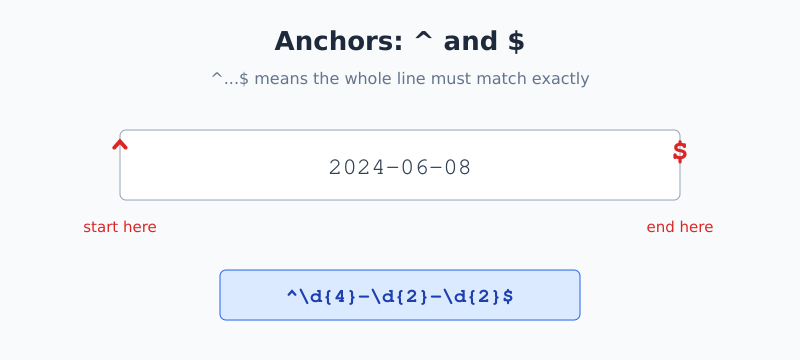
Anchors don’t match characters; they match positions. ^ ties your pattern to the start of a line, and $ ties it to the end. Wrapping a pattern in both — ^...$ — means “the whole line must match exactly,” which is the heart of most validation.
Patterns You’ll Actually Use
Here are battle-tested patterns for everyday jobs. Test them on your own text before trusting them in production.
A four-digit year
\d{4}Four digits in a row. Simple and handy for spotting dates.
A US-style phone number
\d{3}-\d{3}-\d{4}Three digits, a dash, three digits, a dash, four digits — like 555-123-4567.
A basic email check
^\S+@\S+\.\S+$Some non-space characters, an @, more non-space characters, a dot, then more. This is a loose check — it confirms the rough shape, not that an address truly exists.
Honest warning: A “perfect” email regex is famously enormous and still imperfect. For most tasks, a simple shape-check like the one above plus actually sending a confirmation email beats a monster pattern. Don’t over-engineer it.
A hex color code
#[0-9a-fA-F]{6}A hash followed by exactly six characters that are digits or the letters A-F — like #3b82f6.
How to Test a Pattern Safely
The golden rule of regex is: test before you trust. A pattern that looks right can quietly match too much or too little. My workflow is always the same:
- Write the pattern.
- Paste in real sample text — including the tricky edge cases.
- Watch what highlights, and adjust.
That last loop is where the learning happens. Seeing a pattern light up the wrong text teaches you faster than any rulebook. You can run this loop in our free Regex Tester — type a pattern, paste your text, and watch the matches update live.
Common Mistakes to Avoid
- Forgetting to escape special characters. A dot
.means “any character.” To match a literal dot, write\.with a backslash. - Greedy matching. By default
.*grabs as much as possible. If it’s swallowing too much, add a?to make it lazy:.*?. - Skipping anchors in validation. Without
^and$, your pattern can match part of a string while the rest is junk. - Different flavors. Regex varies slightly between languages. A pattern that works in JavaScript may need a tweak in another tool. The core ideas stay the same, but check the details.
Frequently Asked Questions
What does the dot mean in regex?
By default, the dot matches any single character except a line break. So the pattern c.t matches cat, cot, and cut. To match an actual period instead, escape it with a backslash, like this: \. — that tells regex you mean a literal dot.
What’s the difference between * and +?
Both repeat the item before them. The asterisk * means zero or more, so it can match nothing at all. The plus + means one or more, so at least one occurrence is required. Use + when the thing must appear and * when it’s optional.
Why is my regex matching too much?
It’s probably greedy. Patterns like .* grab as many characters as possible by default. Add a question mark to make them lazy, as in .*?, so they match as little as needed. This is the most common surprise when a pattern swallows more than expected.
Is regex the same in every language?
The core symbols are nearly universal, but there are small differences between languages and tools, especially for advanced features. A simple pattern usually works everywhere. For anything complex, test it in the same environment where it will run.
The Bottom Line
Regex stops being scary once you see it as a small set of building blocks: classes for what kind of character, quantifiers for how many, and anchors for where. Combine those three ideas and you can describe almost any text pattern. Keep this cheat sheet handy, and lean on testing instead of memorizing.
Got a pattern to try? Paste it into the free Regex Tester and watch it match your text in real time.

Jan van Dijk
Self-taught Dutch web analyst writing plain-English guides on analytics, data formats and developer tools — and building the free utilities I wish existed.
More about me →