
Have you ever copied a link and noticed it was full of strange codes like %20, %3D, or %26? Maybe you pasted a search result and the URL turned into a wall of percent signs. That’s URL encoding at work.
When I built my first campaign links, these codes confused me. They looked like errors. They’re not — they’re how a URL safely carries characters that would otherwise break it. Let’s unpack what URL encoding is, why %20 means a space, and when you need to care about it.
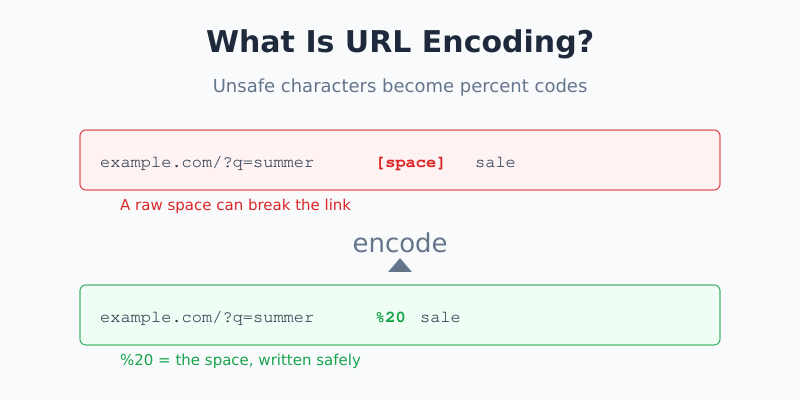
What Is URL Encoding?
URL encoding (also called percent-encoding) is a way to represent characters in a URL that aren’t allowed to appear there directly.
A URL can only safely use a limited set of characters: letters, numbers, and a few symbols like -, ., and _. Everything else — spaces, accented letters, and symbols like & or ? — has a special job or isn’t safe to send. URL encoding swaps those characters for a percent sign followed by two characters that stand in for them.
So a space becomes %20. An ampersand becomes %26. The percent sign tells the browser, “the next two characters are a code, not literal text.”
Why %20 Means Space
This is the question everyone asks first. The answer goes back to how computers store characters.
Every character has a number in a table called ASCII. The space character sits at number 32. Computers love working in hexadecimal (base 16), and 32 in hexadecimal is 20.
URL encoding takes that hex value and puts a percent sign in front of it. So:
- Space = number 32 = hex
20= encoded as%20 - Ampersand
&= number 38 = hex26= encoded as%26 - Question mark
?= number 63 = hex3F= encoded as%3F
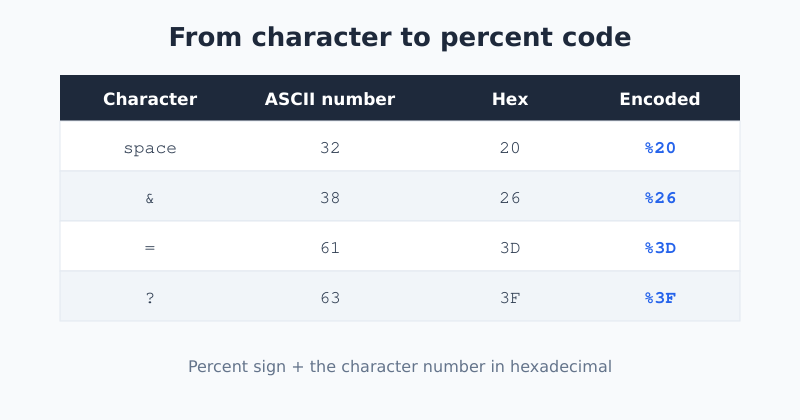
That’s the whole trick. There’s no magic — %20 is just “character number 32, written in hex.” Once you see the pattern, the codes stop looking scary.
Why Spaces Can’t Live in URLs
A space inside a raw URL causes problems. Old systems treated a space as the end of the address, so anything after it could get cut off. To stay safe, the rules (defined in RFC 3986, the standard for URLs) say a space must be encoded.
Heads up: You’ll sometimes see a space written as a plus sign (
+) instead of%20. That’s a special case used in the query string — the part after the?— in form data. Both can mean a space, but they’re not interchangeable everywhere. When in doubt,%20is the safer choice.
Reserved vs Unreserved Characters
Not every character needs encoding. URLs split characters into two groups.
Unreserved characters (safe as-is)
Letters A-Z and a-z, digits 0-9, and the symbols -, ., _, and ~. These never need encoding.
Reserved characters (have a job)
Symbols like ?, &, =, /, and # have a built-in meaning in a URL. A ? starts the query string; an & separates parameters. If you want one of these as data rather than as structure, you must encode it. Otherwise the browser will read it as part of the URL’s plumbing.
A Real Example: Encoding a Campaign Link
Say you’re building a tracked link and your campaign name has a space in it: summer sale. If you drop it straight into the URL, you get trouble:
https://example.com/?utm_campaign=summer saleThat space can break the link. Encoded properly, it becomes:
https://example.com/?utm_campaign=summer%20saleThis is exactly the kind of detail that bites people building UTM parameters by hand. A good UTM builder encodes these characters for you automatically, so you don’t have to remember every code. That’s one less thing to get wrong before a campaign goes live.
When You Need to Encode Manually
- Building links by hand. If you type a URL with spaces or symbols, encode them first.
- Passing data in query strings. Search terms, email addresses, and names often contain characters that need encoding.
- Working with APIs. Many API calls put values in the URL, and those values must be encoded.
- Decoding a messy URL. Sometimes you receive an encoded URL and need to read it. Decoding turns
%20back into a space so it’s human-readable again.
For everyday browsing you rarely encode anything yourself — your browser does it quietly. It only becomes your job when you’re constructing or reading URLs as part of a task.
A Common Mistake: Double Encoding
Avoid encoding twice. If you encode a URL that’s already encoded, the percent sign itself gets encoded into
%25. So%20becomes%2520, and your link breaks in a confusing way. If you see%25where you didn’t expect it, you’ve likely encoded something twice.
Frequently Asked Questions
Why does %20 mean a space?
The space character is number 32 in the ASCII table. Written in hexadecimal, 32 becomes 20. URL encoding adds a percent sign in front of that hex value, giving you %20. So %20 simply means “character number 32,” which is a space.
Is URL encoding the same as Base64?
No. URL encoding makes individual unsafe characters safe inside a URL using percent codes. Base64 converts entire blocks of data into a text format. They’re different tools for different jobs — encoding a link versus encoding a file or binary data.
Do I need to encode URLs myself?
Usually not for normal browsing — your browser handles it. You only need to encode manually when building links by hand, passing data in query strings, or working with APIs. Good tools encode these characters automatically so you don’t have to.
What does %26 mean in a URL?
%26 is an encoded ampersand. An ampersand normally separates parameters in a query string, so if you want an ampersand as part of a value rather than as a separator, you encode it as %26. This prevents the browser from misreading your data.
The Bottom Line
URL encoding looks cryptic but follows one simple rule: swap an unsafe character for a percent sign and its hexadecimal code. Spaces become %20, ampersands become %26, and your links stay intact. Once you understand the pattern, those codes turn from confusing noise into a tidy little safety system.
Building tracked links? Let the UTM Builder handle the encoding for you, so every campaign URL is clean and unbreakable from the start.

Jan van Dijk
Self-taught Dutch web analyst writing plain-English guides on analytics, data formats and developer tools — and building the free utilities I wish existed.
More about me →