
You want to write something for the web — a README file, a blog post, some documentation. Should you write it in Markdown or HTML? Both end up as formatted text in a browser, so what’s the real difference, and when does each one make sense?
I write in both every week. Markdown for quick notes and docs, HTML when I need fine control. Once you understand what each format is built for, choosing between them takes about two seconds. Let’s break down Markdown vs HTML in plain terms.
Quick Comparison Table
| Feature | Markdown | HTML |
|---|---|---|
| Goal | Easy writing | Full control |
| Syntax | Simple shorthand | Angle-bracket tags |
| Readable as plain text | Yes | Not really |
| Learning curve | Minutes | Hours to master |
| Styling control | Limited | Complete |
| Best for | Notes, docs, READMEs | Web pages, emails, layouts |
What Is Markdown?
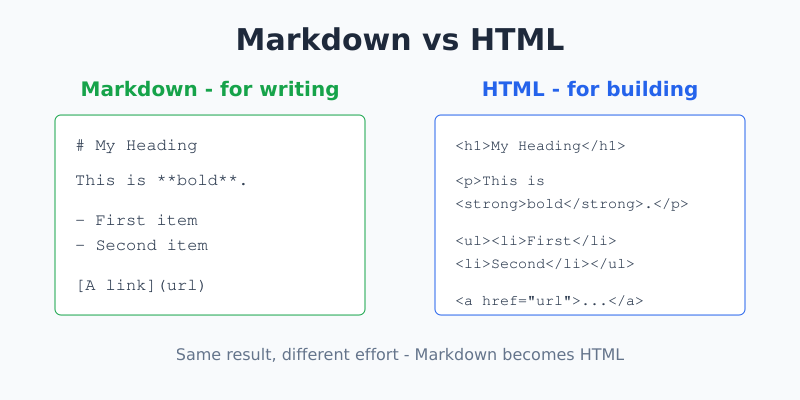
Markdown is a lightweight way to format text using simple symbols. Instead of typing tags, you use plain shorthand. A # makes a heading. Asterisks make text bold. A dash starts a list.
Here’s Markdown in action:
# My Heading

This is **bold** and this is *italic*.

- First item
- Second item

[A link](https://example.com)
The beauty is that it stays readable even before it’s converted. You can glance at raw Markdown and understand it instantly. That’s why it took over places like GitHub, where READMEs and comments are written in Markdown every day.
What Is HTML?
HTML (HyperText Markup Language) is the actual language browsers read to display web pages. It wraps content in tags — labels inside angle brackets that tell the browser what each piece is.
Here’s the same content as HTML:
<h1>My Heading</h1>

<p>This is <strong>bold</strong> and this is <em>italic</em>.</p>

<ul>
  <li>First item</li>
  <li>Second item</li>
</ul>

<a href="https://example.com">A link</a>
It’s more verbose, but every tag is precise. HTML gives you complete control over structure, and combined with CSS you can style it any way you like.
The Key Connection: Markdown Becomes HTML
Here’s the part that surprises beginners: Markdown is converted into HTML before a browser shows it. Markdown isn’t a rival to HTML — it’s a friendly shorthand that a converter turns into HTML behind the scenes.
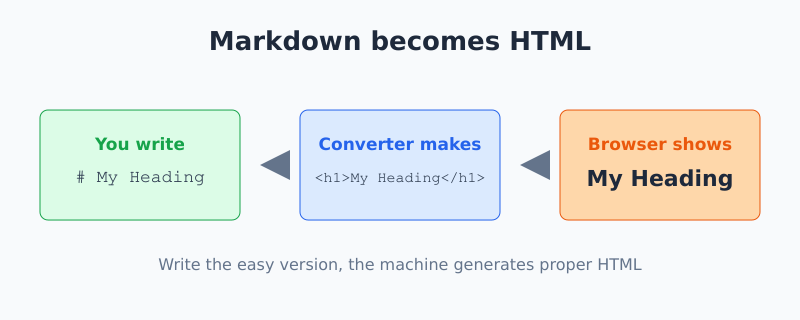
When you type # My Heading in Markdown, the converter produces <h1>My Heading</h1>. You write the easy version; the machine generates the proper HTML. This is why you can preview Markdown live — you’re watching that conversion happen in real time, which is exactly what our Markdown Preview tool does.
When to Use Markdown
- READMEs and documentation. Fast to write, easy for the next person to edit.
- Notes and drafts. You focus on words, not tags.
- Comments and chat. Many platforms support Markdown for quick formatting.
- Content that stays simple. Headings, lists, links, bold, and code — Markdown covers the basics beautifully.
Markdown shines when writing speed matters more than pixel-perfect design.
When to Use HTML
- Web pages. When you need full structure and custom layout.
- Email templates. HTML emails demand precise, inline formatting that Markdown can’t express.
- Anything Markdown can’t do. Tables with merged cells, custom attributes, embedded forms, or special styling.
- Fine-grained control. When you need a specific class, ID, or attribute on an element.
Good to know: You can mix the two. Most Markdown converters let you drop raw HTML right into a Markdown document when you hit something Markdown can’t handle. So you write in easy Markdown and reach for HTML only where you need it.
A Side-by-Side Example
Say you want a bold word inside a sentence.
Markdown:
Save your work **often**.HTML:
<p>Save your work <strong>often</strong>.</p>Both display the same result. Markdown is shorter to type; HTML spells out exactly what each part is. For a quick note, Markdown wins. For a web page that needs a specific structure, HTML earns its extra characters.
Common Mistakes to Avoid
- Expecting identical Markdown everywhere. There are small differences between Markdown “flavors.” Tables and footnotes, for example, aren’t part of the original spec and only work in some converters.
- Forgetting blank lines. Markdown often needs an empty line between blocks. Squashed paragraphs can merge or fail to format.
- Hand-writing HTML when Markdown would do. If it’s a simple doc, typing out tags is just slower.
- Skipping a preview. Always check how your Markdown renders before publishing — a stray symbol can change the output.
Frequently Asked Questions
Is Markdown better than HTML?
Neither is better; they serve different needs. Markdown is faster and easier for simple, text-heavy content like docs and notes. HTML gives complete control for web pages and complex layouts. Since Markdown converts into HTML anyway, the real question is how much control you need.
Does Markdown turn into HTML?
Yes. A converter translates Markdown shorthand into proper HTML tags before a browser displays it. Writing # Heading in Markdown produces an h1 tag in HTML. Markdown is essentially a writing-friendly layer that sits on top of HTML.
Can I use HTML inside Markdown?
In most converters, yes. You can drop raw HTML directly into a Markdown document when you need something Markdown can’t express, like a table with special formatting. This lets you write easy Markdown and reach for HTML only where necessary.
Which should a beginner learn first?
Start with Markdown. It takes minutes to learn and covers most everyday writing. As you grow, pick up HTML for the cases Markdown can’t handle. Learning Markdown first also makes HTML easier, since you will already understand headings, lists, and links.
The Bottom Line
Think of it this way: Markdown is for writing, HTML is for building. Reach for Markdown when you want to type quickly and keep things simple. Reach for HTML when you need precise control over structure and style. And remember they’re partners, not rivals — every bit of Markdown becomes HTML in the end.
Want to see the conversion happen as you type? Try the free Markdown Preview editor and watch your text turn into formatted output live.

Jan van Dijk
Self-taught Dutch web analyst writing plain-English guides on analytics, data formats and developer tools — and building the free utilities I wish existed.
More about me →